In this post we will evaluate the MAX7219 board. This board was designed to control an 8x8 led matrix. I bought four boards in ebay, I like this model.
How to assemble the boards.
We solder two headers in each board.
We will solder the led matrix, be sure to put the led matrix in correct position.
How to connect the boards. We will connect the boards in the following way.
Description of library. This library support 1, 2, 3, 4 ...n boards, so we will need define the quantity of boards at max7219.h file. Initializes the modules. MAX7219_Init() Example: MAX7219_Init();
The standard driver will be available for user that just need the single library for ili9341. The current version 3 can be used for the following displays:
ILI9341 240x320
ST7789 240x240
ST7735 80x160
SSD1331 96x64
Video.
Description of library. This function initializes the driver ILI9341. TFT_Init(void) Example: TFT_Init(); This function resets the display TFT. TFT_Reset(void) Example: TFT_Reset(); This function sets the memory access control. TFT_MemoryAccessControl(frame_memory)
frame_memory: Frame memory, the configuration can be TFT_HORIZONTAL or TFT_VERTICAL.
Example: TFT_MemoryAccessControl(TFT_HORIZONTAL); This function draws a pixel on TFT. TFT_Pixel(x, y, color)
x: x position. Valid values: 0..240
y: y position. Valid values: 0..320
color: color parameter.
Example: TFT_Pixel(100, 100, BLUE); This function sets the size of dot. TFT_SetDotSize(size)
Example: TFT_SetDotSize(2); TFT_Dot(100, 100, BLACK); This function draws a dot on TFT. TFT_Dot(x, y, color)
x: x position. Valid values: 0..240
y: y position. Valid values: 0..320
color: color parameter.
Example: TFT_Dot(100, 100, BLACK); This function sets the type of font. TFT_SetFont(font,letterspacing)
font: Pointer to read all the array.
letterspacing: Letter spacing. Valid values: 1, 2, 3...
Example: TFT_SetFont(Courier_New_Bold_20, 0); This function draws a character on the TFT. TFT_WriteChar(c, x, y, color1, color2)
c: character to be written.
x: x position. Valid values: 0..240
y: y position. Valid values: 0..320
color1: Top color.
color2: Bottom color.
Example: TFT_WriteChar('A', 10, 10, BLACK, WHITE); This function writes text constant on TFT. TFT_ConstText(buffer, x, y, color1, color2)
buffer: Pointer to read all the array.
x: x position. Valid values: 0..240
y: y position. Valid values: 0..320
color1: Top color.
color2: Bottom color.
Example: TFT_ConstText("pic18fxx.blogspot.com", 0, 0, BLACK, WHITE); This function writes text variable on TFT. TFT_Text(buffer, x, y, color1, color2)
buffer: Pointer to read all the array.
x: x position. Valid values: 0..240
y: y position. Valid values: 0..320
color1: Top color.
color2: Bottom color.
Example: unsigned char i; char buffer2[20]; i = 22; sprintf(buffer2, "%03d", i); TFT_Text(buffer2, 10, 10, BLACK, WHITE); These functions write text with alignment. TFT_TextLEFT(buffer, y, color1, color2) TFT_TextCENTER(buffer, y, color1, color2) TFT_TextRIGHT(buffer, y, color1, color2)
buffer: Pointer to read all the array.
y: y position. Valid values: 0..320
color1: Top color.
color2: Bottom color.
Examples: TFT_TextLEFT((char*)"ILI9341", 10, BLACK, WHITE); TFT_TextCENTER((char*)"ILI9341",50, BLACK, WHITE); TFT_TextRIGHT((char*)"ILI9341", 100, BLACK, WHITE); This function fills screen with given color. TFT_FillScreen(color)
color: color parameter.
Example: TFT_FillScreen(BRIGHTGREEN); This function draws a box on TFT. TFT_Box(x1, y1, x2, y2, color)
x1: x coordinate of the upper left rectangle corner. Valid values: 0..240
y1: y coordinate of the upper left rectangle corner. Valid values: 0..320
x2: x coordinate of the lower right rectangle corner. Valid values: 0..240
y2: y coordinate of the lower right rectangle corner. Valid values: 0..320
color: color parameter.
Example: TFT_Box(0, 0, 50, 50, BLUE); This function draws a line on TFT. TFT_Line(x1, y1, x2, y2, color)
x1: x coordinate of the line start. Valid values: 0..240
y1: y coordinate of the line start. Valid values: 0..320
x2: x coordinate of the line end. Valid values: 0..240
y2: y coordinate of the line end. Valid values: 0..320
color: color parameter.
Example: TFT_Line(1, 1, 100, 100, GREEN); This function draws a rectangle on TFT. TFT_Rectangle(x1, y1, x2, y2, color)
x1: x coordinate of the upper left rectangle corner. Valid values: 0..240
y1: y coordinate of the upper left rectangle corner. Valid values: 0..320
x2: x coordinate of the lower right rectangle corner. Valid values: 0..240
y2: y coordinate of the lower right rectangle corner. Valid values: 0..320
color: color parameter.
Example: TFT_Rectangle(1, 1, 100, 100, GREEN); This function draws a rounded edge rectangle on TFT. TFT_RectangleRound(x1, y1, x2, y2, radius, color)
radius: radius of the rounded edge.
Example: TFT_RectangleRound(1, 1, 100, 100, 6, GREEN); This function draws a filled rounded edge rectangle on TFT. TFT_RectangleRoundFill(x1, y1, x2, y2, radius, color) Example: TFT_RectangleRoundFill(1, 1, 100, 100, 6, GREEN); This function draws a circle on TFT. TFT_Circle(x1, y1, radius, color)
x1: x coordinate of the circle center. Valid values: 0..240
y1: y coordinate of the circle center. Valid values: 0..320
radius: radius size
color: color parameter.
Example: TFT_Circle(100, 100, 10, BLACK); This function draws a filled circle on TFT. TFT_CircleFill(x1, y1, radius, color) Example: TFT_CircleFill(100, 100, 10, BRIGHTRED); This function draws an image on a desired location. TFT_Icon(buffer, x, y, width, height)
buffer: Pointer to read all the array.
x: x position.
y: y position.
width: width of the image in pixels.
height: height of the image in pixels.
Example: TFT_Icon(icon_play, 10, 16, 20, 34);
This function draws an image with transparent color on a desired location. TFT_IconTransparent(buffer, x, y, width, height, color)
buffer: Pointer to read all the array.
x: x position.
y: y position.
width: width of the image in pixels.
height: height of the image in pixels.
color: transparent color.
Example: TFT_IconTransparent(icon_speaker, 158, 25, 22, 18, WHITE); How to configure the library. Create a new project and copy the follows files.
disptft.c, disptft.h
spi_pic18f.c, spi_pic18f.h
time_delay.c, time_delay.h
datatypes.h
font.c, font.h
bitmap.c, bitmap.h
bit_settings.h
main.c
Connection.
Note:
The pins CS, RESET and DC can be configured in the file ili9341.h
TFT Bitmap Editor. C#
This software programmed at c# can be used to make bitmaps.
SD CARD. This demo uses FatFs library. You can download this great library here!. You need to do some modifications to use FatFs with XC8 or just you can use the FatFs library configured by me. FatFs has two variants:
FatFs - Generic FAT Filesystem Module. This one is the most complete library.
Petit FAT File System Module. Basically is limited in functions and does not support long file names. But this version can be used on microcontrollers with limited memory, for example a pic18f4550.
This function scans some files. ScanFiles(buffer, next_previous)
buffer: This parameter returns the name of file.
next_previous: This parameter is used to move the tab. You can use SCAN_FILES, NEXT_FILE and PREVIOUS_FILE.
This function basically is used to show a list of files. The number of files is defined in storage.h Example: char buffer1[100]; TFT_SetFont(Courier_New_Bold_20, 0); ScanFiles(buffer1, SCAN_FILES);
This function opens a file or directory. OpenFile(buffer)
buffer: This parameter reads the file name.
Basically using these functions you can select a file and open it. Example: char buffer1[100]; TFT_SetFont(Courier_New_Bold_20, 0); ScanFiles(buffer1, SCAN_FILES); while(1) { while(!BUTTON1) { ScanFiles(buffer1, NEXT_FILE); Delay_ms(300);
STM32 Support. This library can be used on STM32. Basically any board with interface FSMC can be used. For this demo, the board STM32_F4VE will be configured.
Software.
This is the necessary software for building a project.
STM32CubeMX
System Workbench for STM32
Creating a new project from CubeMX. Basically, In this step, we go to configure these aspects.
RCC
SYS
FSMC
GPIO
Copying the libraries.
Basically, in this step, we go to do the following.
Copy the libraries.
Set the path of the libraries.
Compile the project.
Testing the Demo. Basically, in this step, we go to do the following.
Configure the ST-Link.
Set your display.
Burn the hexadecimal file.
Drives and "Hello World!
For now, these are the supported drives. You can add a new driver follow the format of the library.
What version do I need? The version 1.0 is ideal for microcontroller with few ROM memory, this library has not got graphics functions.
The version 2.0 includes graphic functions and a new scroll function, ideal for projects like mp3 players. This library needs a little more of ROM memory. This version is FREE!.
Description of library.
Initializes the OLED module. Oled_Init(void) Example: Oled_Init(); Sets font that will be used. Oled_SetFont(_font, _width, _height, _min, _max)
Prints text constant on OLED with scroll. Oled_ConstTextScroll(buffer)
buffer: text to be written.
Example: Oled_SetFont(Terminal12x16, 12, 16, 32 , 127); Oled_ResetScroll(); while(1){ Oled_ConstTextScroll("This is a new scroll function "); Delay_ms(50); }
Prints text variable on OLED with scroll. Oled_TextScroll(buffer)
buffer: text to be written.
Example: unsigned char i; char buffer2[20]; i = 22; sprintf(buffer2, "%03d ", i); Oled_SetFont(Terminal12x16, 12, 16, 32 , 127); Oled_ResetScroll(); while(1){ Oled_TextScroll(buffer2); Delay_ms(50); } Resets the scroll. Oled_ResetScroll(void) This function must be called before of a new scroll function. Example: Oled_ResetScroll(); Fills OLED memory. Oled_FillScreen(pattern)
pattern: byte to fill OLED memory.
Example: Oled_FillScreen(0xFF); Displays bitmap on OLED. void Oled_Image(buffer)
buffer: image to be displayed.
Example: Oled_Image(truck_bmp); Displays an image on a desired location. Oled_Icon(buffer, seg, pag, _width, _height)
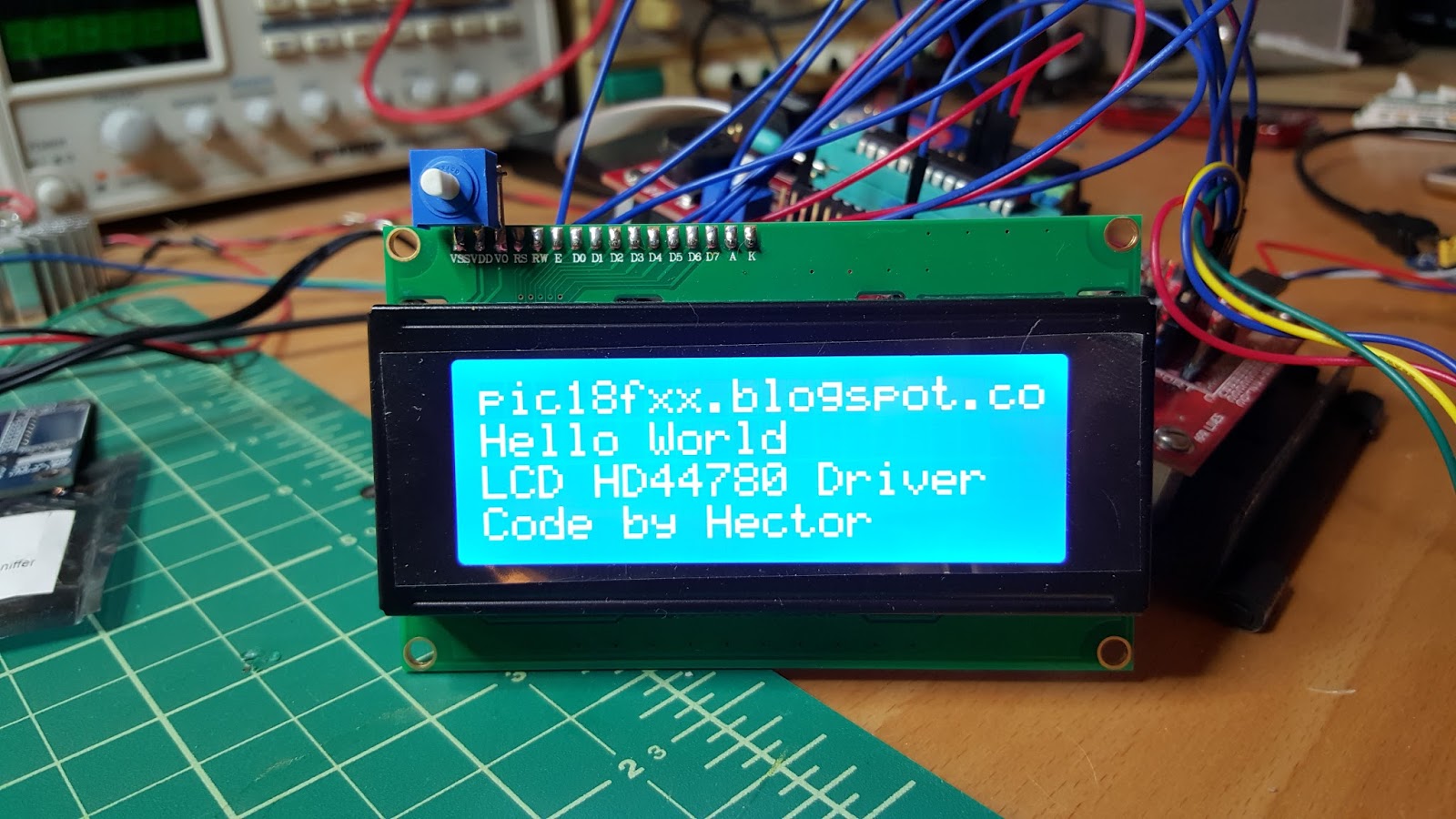
This library allows control Liquid Crystal displays (LCDs) based on the Hitachi HD44780 (or a compatible). The library works with in 4 bit mode interface. Brian Hicks made an evaluation of this code.
Video.
Description of library.
void Lcd_Init(void) This function initializes the Lcd module. Note: You can change the connection of lcd module in hd44780.h file. Example: Lcd_Init(); Lcd_Command(LCD_CLEAR);
void Lcd_ConstText(y, x, buffer) This function prints text constant on the Lcd.


 Video.